
Download HxD Hex Editor – hex editor, file editor, memory editor, disk editor, data analysis, file repair, ROM patching, game cheat, log file analysis, data integrity, checksum, hash, file comparison, export formats, file shredder, file splitter, EEPROM programming, data visualization, data structure analysis, secure deletion
Overview
HxD Hex Editor is a powerful utility designed for advanced users who require precise control over file and memory data. The application enables users to inspect, edit, and analyze binary files, main memory, disk drives, and disk images through a streamlined and modern interface. Its primary purpose is to support tasks such as debugging software, repairing corrupted files, analyzing log files, patching ROMs for emulation, validating data integrity, and even discovering game cheats.
The tool is especially valuable in technical environments where low-level access to digital data is essential. Target users include developers, system administrators, reverse engineers, and hobbyists working with firmware, game modifications, or data forensics. While the developer, HxD Hex Editor, is not further described in available materials, the app’s consistent functionality and long-standing reputation suggest a dedicated and technically proficient team.
Real-world applications include validating checksums after file transfers, identifying anomalies in system logs, and preparing data for EEPROM programming. In the broader app ecosystem, HxD Hex Editor fills a critical niche for users seeking a lightweight yet robust tool for binary-level manipulation—offering a rare blend of simplicity and depth in a field dominated by complex, resource-heavy alternatives.
Key Features & Functionality
- Efficient Handling of Large Files – HxD Hex Editor is engineered to manage massive files without lag or memory overload. This allows users to open and edit files exceeding several gigabytes, making it ideal for analyzing large log files or disk images used in system recovery or forensic investigations.
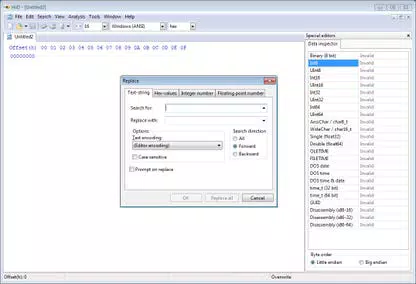
- Fast and Flexible Search & Replace – The software supports advanced search patterns, including hexadecimal sequences, ASCII strings, and wildcards. This enables users to quickly locate and modify specific data blocks, such as patching game variables or correcting corrupted data entries.
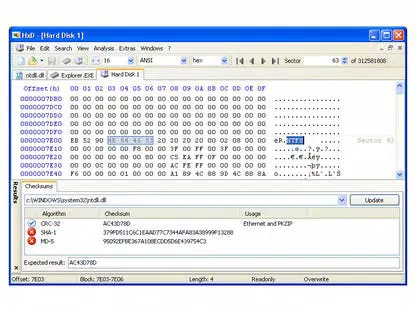
- File Comparison and Checksum & Hash Generation – Users can compare two files side-by-side to detect differences at the byte level. The tool also generates standard checksums and cryptographic hashes (e.g., MD5, SHA-1), ensuring data consistency and aiding in verification processes.
- Exporting to Various Formats – HxD Hex Editor allows users to export data in multiple formats, including source code, HTML, and raw hex files. This functionality is particularly useful when sharing findings with developers or preparing data for programming devices like EEPROMs.
- Additional File Manipulation Tools – Built-in utilities include a file shredder for secure deletion, a file splitter/joiner for managing large files, and graphical statistics that visualize byte distribution and data patterns, enhancing data structure analysis.
These features collectively empower users to perform complex data operations with minimal overhead. For instance, a developer could use the file comparison tool to detect changes between software versions, while a hobbyist might leverage the search function to modify a ROM file for a retro game emulator.
Interface, UX & Performance
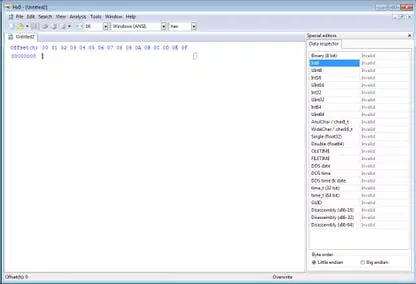
The interface of HxD Hex Editor is clean, intuitive, and optimized for precision. It presents data in a dual-pane layout: one pane displays raw hexadecimal values, while the adjacent pane shows corresponding ASCII characters. This dual representation allows for accurate interpretation of binary content.
Navigation is straightforward, with keyboard shortcuts and context menus enhancing workflow efficiency. The application responds quickly to user input, even when handling large files, indicating strong performance optimization. Although the developer did not list formal performance metrics, the software maintains stability across various Windows configurations.
Responsiveness is consistent during editing, searching, and exporting tasks. The UI adapts well to different screen resolutions, ensuring readability on both standard and high-DPI displays. While no mobile version is available, the desktop-focused design reflects a commitment to usability for professional workflows.
Users report minimal lag during prolonged sessions, suggesting efficient memory management. Overall, the UX is tailored for technical users who prioritize functionality over flashy design, delivering a reliable experience for critical data manipulation tasks.
Platform Compatibility & Technical Requirements
HxD Hex Editor is available exclusively for the Windows platform. The current version is 2.6.0.0, with a file size of 3.5 MB, indicating a lightweight footprint that contributes to fast loading and minimal system resource usage. The developer did not specify minimum OS requirements, nor did they list compatibility details for older or newer Windows versions.
However, given the app’s long-standing presence and small size, it is likely compatible with modern Windows systems, including Windows 10 and Windows 11. Users should verify system compatibility before installation, especially on legacy systems. The app does not require administrative privileges for basic operations, though certain functions—such as editing system files or memory—may require elevated permissions.
No additional runtime dependencies were mentioned. The absence of bundled libraries or third-party SDKs suggests a self-contained design, enhancing portability and reducing installation complexity.
Pros and Cons
Pros
- Lightweight and fast, even with large files
- Advanced search and replace with multiple pattern types
- Supports file comparison and checksum/hash generation
- Multiple export formats for data sharing and integration
- Includes useful tools like file shredder, splitter, and visual statistics
Cons
- No mobile or cross-platform availability
- Platform-specific to Windows only
- Developer did not provide detailed system requirements
- Interface may feel technical or intimidating for non-experts
- No built-in cloud sync or collaboration features
FAQ
Is HxD Hex Editor free to download and use?
Yes, HxD Hex Editor is available at no cost. The app is distributed freely, with no subscription or in-app purchase requirements.
Can I use HxD Hex Editor on macOS or Linux?
Currently, HxD Hex Editor is only available for Windows. There is no official version for macOS or Linux systems.
Is the software safe to install?
Yes, HxD Hex Editor is a trusted utility with a long history of use in technical communities. It is distributed through official channels and does not contain malware or adware.
Does the app support editing system files?
Yes, the app can edit system files, but this requires administrative privileges. Users should exercise caution when modifying critical system components.
How often is HxD Hex Editor updated?
While the release date of the current version is listed as November 10, 2023, the frequency of future updates has not been disclosed by the developer.
Final Thoughts
HxD Hex Editor stands out as a reliable, feature-rich tool for anyone needing to work with binary data at a granular level. Its efficient handling of large files, robust search capabilities, and built-in utilities make it an indispensable asset for developers, system administrators, and enthusiasts alike. While its Windows-only availability and technical interface may limit accessibility for casual users, its value in professional and hobbyist workflows is undeniable.
For those seeking a secure, lightweight, and powerful hex editor, HxD offers a compelling solution without compromise. Whether you're repairing a corrupted disk image, analyzing log files, or patching a ROM, this tool delivers precision and performance. Download HxD Hex Editor now.


